
Mixed Reality vs Virtual Reality: Meta Quest Gaming Guide
Imagine putting on your Meta Quest headset and entering a completely different world.
You’re standing inside a colorful virtual supermarket. Shelves are filled with products, customers move around the store, and everything you see has been created digitally.
Now imagine another experience.
You put on the same headset, but instead of entering a fictional environment, you can still see your actual living room.
Suddenly, a small animated robot appears on your coffee table.
A virtual portal opens against your wall, and digital objects seem to interact with the furniture around you.
Both experiences use immersive technology, but they work differently.
The first is virtual reality (VR).
The second is mixed reality (MR).
Modern Meta Quest 3 and Meta Quest 3S headsets support experiences that combine virtual content with the player’s physical surroundings.
But what actually separates mixed reality from traditional VR?
And which approach creates a better gaming experience?
This guide explains mixed reality vs. virtual reality, how both technologies work on Meta Quest, and what players should know before exploring these different types of games.
1. What Is Virtual Reality Gaming?
Virtual reality creates a computer-generated environment that replaces the player’s normal view of the physical world.
When you wear a compatible VR headset, you can look around and interact with a digitally created space.
Depending on the game, you might explore a fantasy world, drive a racing car, manage a supermarket, or participate in an action adventure.
How Does VR Work?
The headset tracks your head movements and updates the virtual scene accordingly.
When you turn your head, your view changes to match the direction you’re facing.
Compatible motion controllers or hand-tracking systems allow you to interact with virtual objects.
For example, in a VR driving simulator, you might sit inside a digital vehicle and look around its interior.
The road, dashboard, buildings, and surrounding environment exist entirely inside the game.
Why Is VR Popular for Immersive Games?
VR allows developers to create environments that would be difficult or impossible to experience in everyday life.
Players can explore fictional locations, interact with imaginative characters, and experience gameplay from a first-person perspective.
The biggest advantage is the ability to enter a completely designed virtual world.
2. What Is Mixed Reality Gaming?
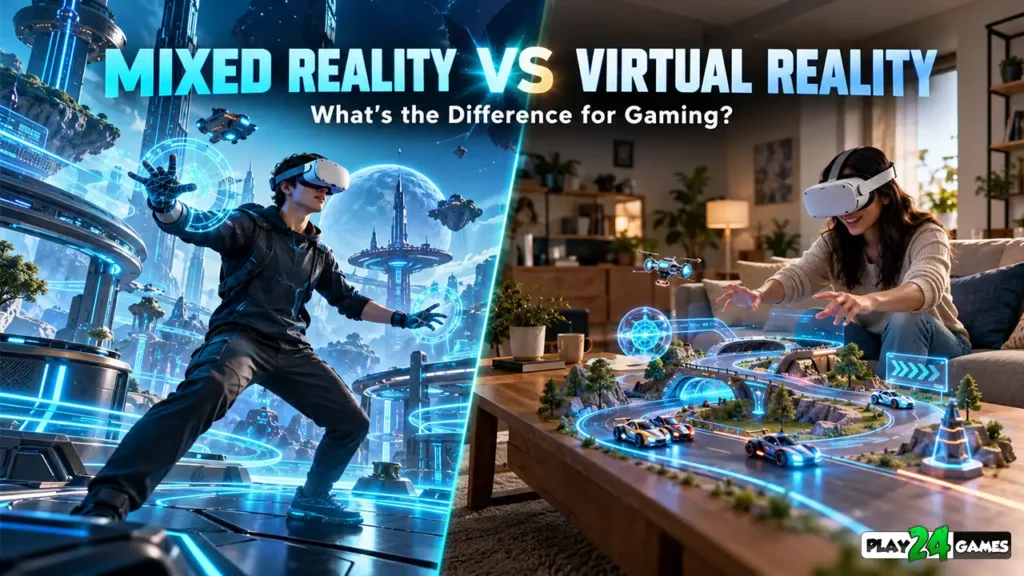
Mixed reality combines digital content with the player’s physical surroundings.
Instead of completely replacing the real world, an MR application can display virtual objects within the environment around the player.
For example, imagine sitting in your living room.
A mixed reality game could place a miniature racing track across your floor.
Small digital cars might race around the track while you watch from your actual sofa.
The room remains visible, but the gameplay objects are virtual.
Mixed Reality Uses the Physical Environment
Some MR applications can use information about real-world surfaces and room layouts.
For example, a game might position a virtual character on a detected table or create an interaction near a wall.
However, these features depend on the application’s implementation and the headset’s supported capabilities.
Not every mixed reality application uses detailed room understanding.
Official Meta passthrough documentation explains how compatible devices combine camera-based views of the physical world with rendered digital content. Meta for Developers
3. Mixed Reality vs Virtual Reality: Main Differences
Both technologies use immersive displays and tracking systems, but they provide different experiences.
| Feature | Virtual Reality | Mixed Reality |
|---|---|---|
| Environment | Fully digital world | Physical surroundings combined with digital content |
| Real-World Visibility | Usually hidden during gameplay | Visible through passthrough |
| Gameplay Space | Designed virtual environment | May use the player’s actual room |
| Virtual Objects | Exist inside a digital world | Can appear positioned in physical spaces |
| Room Awareness | Not always necessary | Useful for room-aware interactions |
| Immersion Style | Full environmental immersion | Blended physical and digital experience |
| Example Gameplay | Driving simulator or virtual adventure | Virtual characters appearing on a real table |
| Physical Space Requirements | Depends on the game | Depends on the game and its room interactions |
Neither technology is automatically better.
A fully virtual environment may be more suitable for a large fantasy adventure.
Mixed reality may be more appropriate for experiences that benefit from using the player’s physical surroundings.
The best approach depends on the game’s design.
4. How Does Meta Quest Passthrough Work?
Passthrough is one of the technologies that makes mixed reality possible.
Compatible Meta Quest headsets use external cameras to capture the surrounding environment and display a view of it inside the headset.
Digital objects can then be rendered alongside that view.
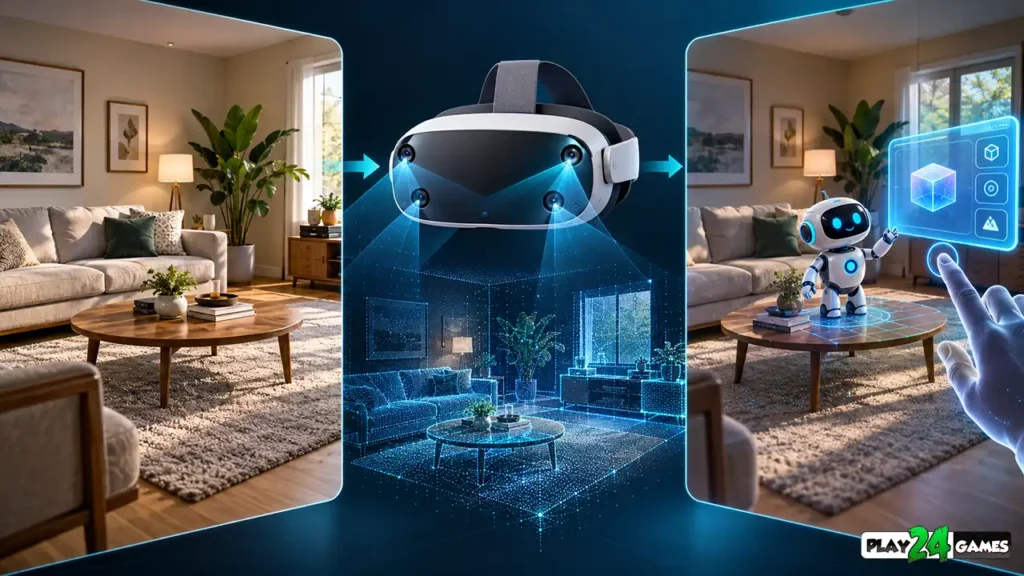
Why Passthrough Matters
Without passthrough, a player inside a fully immersive VR experience generally cannot see the physical room directly through the display.
With passthrough enabled, the player can see a camera-based representation of the environment.
This creates opportunities for games that combine physical surroundings with digital interactions.
Is Passthrough the Same as Looking Through Your Eyes?
Not exactly.
The displayed image comes from cameras and processing systems rather than direct optical vision.
Image quality, depth perception, lighting, and visual distortion can vary depending on the device and environment.
For this reason, players shouldn’t rely on passthrough as a perfect replacement for normal vision when navigating physical hazards.
Does Every Meta Quest Headset Have the Same Passthrough Quality?
No.
Passthrough capabilities vary between headset generations.
For example, Meta Quest 3 and Quest 3S support full-color passthrough, while earlier devices may provide different visual capabilities.
Individual games may also require specific hardware features.
Always check a game’s official compatibility information.
Meta’s passthrough documentation, updated September 15, 2026, describes full-color passthrough, environment depth, and related capabilities on supported devices. Meta for Developers
5. How Virtual Objects Interact With Your Real Room
One of the most interesting aspects of mixed reality is the possibility of making digital objects appear connected to physical surroundings.
Imagine placing a virtual toy car on a real table.
The car could appear to drive across the tabletop.
A virtual character might stand on the floor near your furniture.
These effects require more than simply displaying a 3D model.
Understanding Real-World Surfaces
Some mixed reality applications use scene-understanding systems to identify parts of the physical environment.
These systems may provide information about floors, walls, tables, and other surfaces.
A game can use this information to position virtual content.
What Is Occlusion?
Occlusion occurs when one object visually blocks another.
Imagine a virtual ball rolling behind your real sofa.
With suitable depth and occlusion support, the sofa can appear in front of the virtual ball.
This makes the digital object seem more naturally connected to the physical environment.
Without proper occlusion, virtual objects may appear to float unnaturally in front of real furniture.
Meta’s immersive features documentation explains how scene understanding, depth information, and spatial features support these interactions. Meta for Developers
6. What Are Spatial Anchors in Mixed Reality?
Spatial anchors help applications associate virtual content with specific physical locations.
Imagine placing a virtual picture on your living room wall.
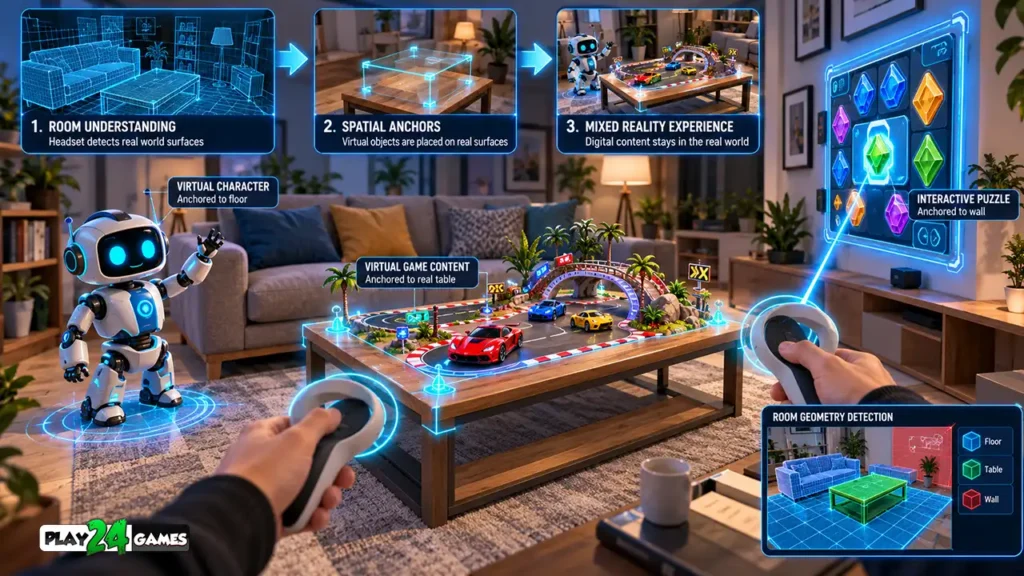
Without a stable spatial reference, the picture might not remain correctly aligned as the headset moves.
A spatial anchor provides a reference that the application can use to maintain the virtual object’s position.
Can Virtual Objects Stay in the Same Place?
Supported applications can use persistent spatial anchors to save and restore the placement of virtual objects between sessions.
For example, a mixed reality decorating game could allow players to arrange digital decorations around a room.
When they return later, the application may restore those objects to their previously saved positions.
This requires appropriate implementation and successful localization of the physical environment.
It isn’t automatic in every mixed reality game.
Meta’s official spatial anchors tutorial, updated October 7, 2026, explains how developers can create, save, load, and manage spatial anchors. Meta for Developers
7. Which Games Work Better in Virtual Reality?
Fully immersive VR is particularly useful when the environment itself is central to the experience.
Racing and Driving Games
A driving simulator can place players inside a virtual vehicle.
The surrounding road, traffic, weather, and scenery can all be designed to support the intended gameplay.
A completely digital environment gives developers control over the entire scene.
Adventure and Exploration Games
Fantasy adventures, science-fiction experiences, and exploration games often benefit from complete environmental immersion.
Players can explore locations that don’t exist in the physical world.
Simulation Games
VR simulation games can recreate shops, factories, workshops, and other environments.
Players can interact with digital objects while completing structured objectives.
For example, a VR supermarket simulator may involve organizing products, managing inventory, and interacting with equipment.
If you’re interested in this genre, read our VR shop simulator games guide for a closer look at immersive store-management gameplay.
8. Which Games Work Better in Mixed Reality?
Mixed reality is especially interesting when the player’s physical environment contributes to the gameplay.
Tabletop Games
Imagine a miniature strategy battlefield appearing on your dining table.
Players could examine units from different angles and interact with digital pieces.
The physical table becomes part of the presentation.
Puzzle Games
A mixed reality puzzle game could place virtual clues or objects around a room.
Players might interact with digital elements positioned near real-world surfaces.
Creative and Building Games
Mixed reality can also support creative experiences.
For example, players could arrange virtual furniture, build miniature environments, or place animated objects around their surroundings.
Fitness and Movement Experiences
Some immersive fitness applications use passthrough to help players remain aware of their physical surroundings.
However, passthrough does not eliminate the need for a safe play area.
The main advantage of mixed reality is not simply seeing your room. It is using the relationship between physical and digital spaces to create meaningful interactions.
9. Is Mixed Reality More Comfortable Than Virtual Reality?
Comfort depends on the specific application.
Mixed reality can help players remain visually connected to their physical environment.
For some experiences, this may make the transition between physical and digital surroundings feel more manageable.
However, mixed reality isn’t automatically more comfortable than traditional VR.
Factors That Affect Comfort
Passthrough image quality, tracking stability, object placement, visual effects, and gameplay movement can all influence the experience.
A poorly positioned virtual object may require uncomfortable reaching.
A game that encourages players to move quickly around furniture may also create safety concerns.
Prepare Your Physical Space
Before playing, remove obstacles from the intended play area.
Check that your headset boundary is configured appropriately.
Avoid interacting with virtual objects in ways that could cause you to collide with real furniture.
If you experience dizziness, nausea, or visual discomfort, stop playing and rest.
For general headset preparation and comfort recommendations, read our Meta Quest VR beginner’s guide.
10. Does Mixed Reality Require Room Scanning?
Some mixed reality experiences can operate without a detailed room scan.
For example, a simple application might display a virtual object in front of the player using passthrough.
More advanced applications may use room information to place objects accurately or interact with physical surfaces.
What Is Space Setup?
On supported Meta Quest devices, Space Setup can help capture information about the physical environment.
Compatible applications may then use available scene data to identify surfaces and understand room geometry.
Why Might a Game Request Spatial Data Permission?
Room-aware applications may require permission to access certain spatial information.
This can include scene models or depth data.
Meta’s spatial data permission documentation, updated October 7, 2026, explains that applications using protected spatial data must request the relevant permission. Meta for Developers
Does Passthrough Mean Every Game Can Record Your Room?
No.
Standard passthrough rendering and direct camera-data access are different capabilities.
With standard passthrough, the operating system can display the physical environment without providing raw camera images directly to the application.
Applications that require direct camera access must use supported APIs and applicable permissions.
Players should review permission requests and privacy information before granting access.
11. How Mixed Reality Could Change Simulation Games
Simulation games are an interesting area for mixed reality because they frequently involve familiar objects and activities.
Imagine a traditional virtual shop simulator.
The player enters a fictional store, organizes products, and manages business operations.
Now consider a hypothetical mixed reality version.
Instead of entering a fully virtual shop, the player might place a miniature digital store on a real table.
They could arrange shelves, examine products, and manage a small virtual business within their physical surroundings.
Different Experiences, Similar Gameplay Ideas
The underlying management mechanics might remain familiar.
However, the presentation and interaction methods would change.
Fully immersive VR would allow the player to stand inside a complete fictional store.
Mixed reality could allow the player to observe and interact with a miniature store inside their actual room.
Neither approach is necessarily superior.
They serve different creative goals.
Play24Games and Immersive Simulation
At Play24Games, our VR portfolio includes immersive simulation concepts such as Cosplay Shop Simulator VR and Bakery Supermarket Simulator VR.
These projects demonstrate our interest in adapting familiar simulation activities into immersive gaming experiences.
The mixed reality scenarios described in this section are hypothetical examples, not announcements of MR functionality in those projects.
You can explore our VR games collection for information about current experiences and official releases.
12. Mixed Reality vs. Virtual Reality: Which Should You Choose?
The right choice depends on the experience you want.
Choose a fully immersive VR game when you want to enter a complete fictional environment.
This might include driving simulations, adventures, exploration games, or experiences built around large digital worlds.
Consider mixed reality when you want digital content to appear within your physical surroundings.
Tabletop games, room-based puzzles, and creative applications can be particularly suitable.
Check Compatibility Before Playing
Not every Meta Quest application supports mixed reality.
Some games are designed exclusively for fully immersive VR.
Others include passthrough or optional MR modes.
Compatibility can also depend on the headset model.
Before downloading a game, check its official description, supported devices, and available features.
Don’t Judge a Game Only by Its Technology
A game doesn’t become better simply because it includes passthrough or room scanning.
Gameplay quality still depends on clear controls, interesting objectives, comfortable interactions, and thoughtful design.
The best immersive technology is the one that supports the experience the player actually wants.
Common Mixed Reality Gaming Mistakes to Avoid
A common mistake is assuming that every Meta Quest game supports mixed reality.
Another is believing that passthrough provides a perfect view of the physical environment.
Players may also overlook the importance of lighting, room setup, and appropriate permissions.
Some users expect virtual objects to interact automatically with real furniture, even when the game doesn’t implement scene understanding or collision behavior.
Finally, mixed reality should never be treated as a reason to ignore physical safety.
Keep your play area clear and follow the game’s recommended setup instructions.
Conclusion
Virtual reality and mixed reality offer different approaches to immersive gaming.
VR allows players to enter fully digital environments where every element can be designed around the gameplay.
Mixed reality combines virtual content with physical surroundings, creating opportunities for room-aware interactions and spatial experiences.
Technologies such as passthrough, scene understanding, environment depth, and spatial anchors make these interactions possible on supported devices.
However, the best experience depends on the game’s design, the player’s preferences, and the available hardware.
As immersive gaming continues to develop, both VR and MR provide opportunities for new forms of interactive entertainment.
For more VR gaming insights, game announcements, and upcoming projects, visit Play24Games News and Updates.
Frequently Asked Questions
1. What is the main difference between mixed reality and virtual reality?
Virtual reality replaces the player’s surroundings with a computer-generated environment. Mixed reality combines digital content with the physical world, allowing virtual objects to appear within real spaces.
2. Does Meta Quest support mixed reality gaming?
Compatible Meta Quest headsets support mixed reality features such as passthrough and spatial interactions. However, individual games must implement the relevant capabilities, and compatibility varies by device.
3. Do mixed reality games require a room scan?
Not always. Basic passthrough experiences may work without detailed room scanning. Applications that rely on room geometry or scene understanding may require Space Setup and appropriate permissions.
4. Is mixed reality better than virtual reality for gaming?
Neither is universally better. Fully immersive VR is useful for experiences built around complete digital worlds, while mixed reality is useful when gameplay benefits from interacting with the player’s physical surroundings.
5. Can virtual objects interact with real furniture in mixed reality?
Yes, supported applications can use room information, spatial anchors, collision systems, and depth data to create interactions between virtual objects and physical surfaces. The exact behavior depends on the application and hardware.