

How Spatial Audio Makes Meta Quest VR Games Feel More Real
How Spatial Audio Makes Meta Quest VR Games Feel More Real
Imagine standing inside a virtual supermarket.
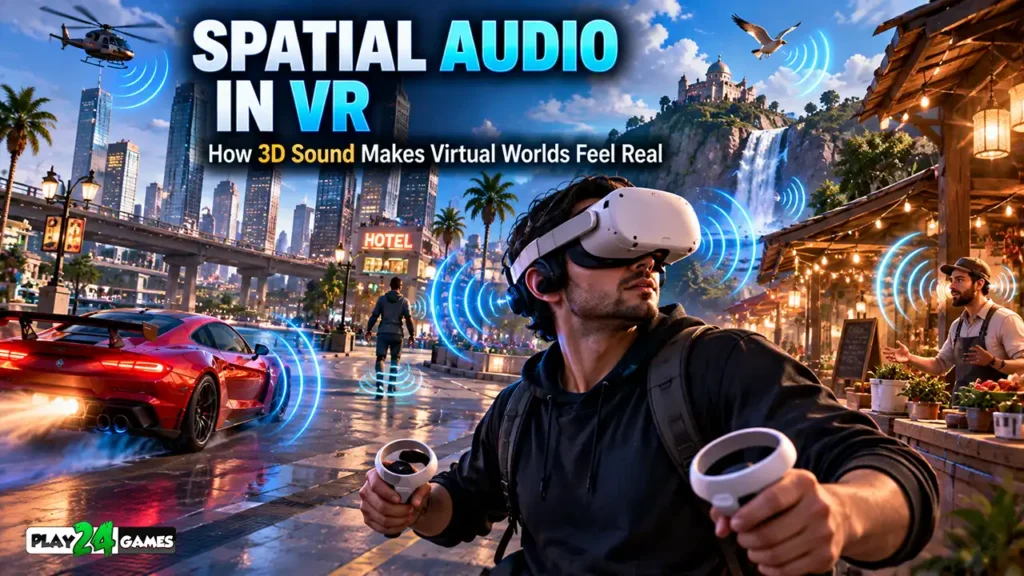
You hear a shopping cart rolling somewhere behind you.
A customer speaks from your left.
A refrigerator hums quietly near the back wall, while music plays from a speaker above the checkout counter.
You turn your head toward the customer.
Their voice now seems to come from directly in front of you.
As you walk toward the refrigerator, its sound becomes more noticeable.
Nothing about the physical room around you has changed.
Yet your brain is receiving audio information that makes the virtual environment feel like a place you can explore.
This is one of the most interesting features of Meta Quest spatial audio.
Virtual reality is often associated with immersive visuals, motion controllers, and interactive environments.
However, sound plays an equally important role in creating the feeling of being inside a virtual world.
A well-designed VR experience doesn’t simply play music and sound effects.
It uses audio to communicate where objects are located, how far away they might be, and what is happening around the player.
In this guide, we’ll explore how spatial audio works, why it matters in Meta Quest games, and how thoughtful sound design can make virtual environments more convincing and enjoyable.
1. What Is Spatial Audio in Virtual Reality?
Spatial audio is a technology that makes sounds appear to originate from specific locations in a three-dimensional environment.
In traditional games, audio commonly plays through stereo speakers or headphones.
Sounds may be louder in the left or right channel, depending on their location.
Spatial audio extends this concept by considering how sounds are perceived around the listener.
A sound might appear to originate from behind, above, below, or beside the player.
A Simple Example
Imagine standing in the center of a virtual room.
A radio is positioned on a table to your right.
With appropriately implemented spatial audio, the radio should sound as though it is coming from that location.
If you turn to face the radio, the perceived direction changes relative to your head.
If you move farther away, the radio may become quieter.
These effects help connect what players hear with what they see.
Why Does This Matter?
In virtual reality, players can naturally look around and interact with their surroundings.
When audio responds consistently to those movements, the environment can feel more believable.
According to Meta’s Horizon OS Audio documentation, updated September 15, 2026, spatial audio supports three-dimensional sound positioning, distance attenuation, room acoustics, and head-tracking integration. Meta for Developers
2. How Is Spatial Audio Different From Stereo Sound?
Stereo audio uses two channels, typically left and right.
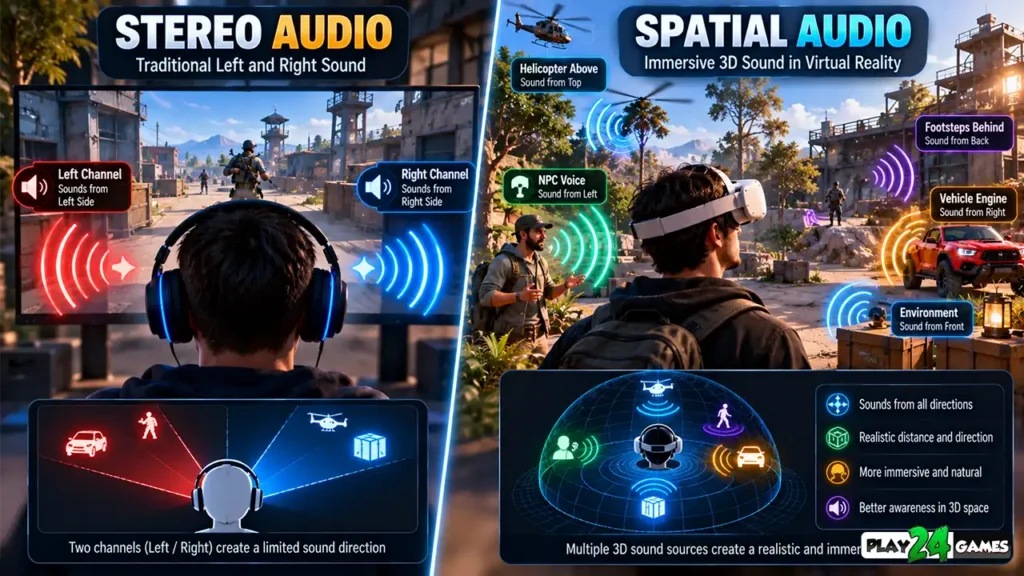
It can create a sense of width and direction, but ordinary stereo playback doesn’t necessarily account for the listener’s position or head movements.
Spatial audio is designed to make sound behave more like it exists within the virtual environment.
Stereo Audio Example
Imagine playing a racing game on a smartphone.
You hear an engine sound and background music.
The game may use stereo panning to make another vehicle sound louder in one ear.
However, the audio presentation generally remains connected to the game’s screen and camera system.
Spatial Audio Example
Now imagine standing beside a virtual racing car in VR.
The engine is positioned directly in front of you.
You walk around the vehicle.
As your position changes, the engine’s perceived direction and distance can change too.
This creates a stronger relationship between the vehicle and its sound.
Spatial Audio vs. Stereo Audio
| Feature | Traditional Stereo Audio | Spatial Audio |
|---|---|---|
| Sound Channels | Usually left and right | Rendered for spatial perception |
| Directional Positioning | Primarily left-right panning | Can represent directions around the listener |
| Head Tracking | Not inherent | Can update sound direction with head movement |
| Distance Effects | Possible through game logic | Commonly integrated into 3D audio |
| Environmental Acoustics | Possible with added processing | Can model room-dependent effects |
| Typical Application | Music, menus, conventional games | Immersive VR environments and interactions |
Stereo audio remains useful in VR.
For example, menu music may not need to originate from a particular object in the virtual world.
The best audio approach depends on what the sound is intended to communicate.
3. How Does Meta Quest Spatial Audio Work?
Spatial audio relies on several techniques that help reproduce the way people naturally hear sound.
One important concept is the Head-Related Transfer Function, commonly called HRTF.
What Is HRTF?
When a sound reaches your ears, its characteristics are affected by the shape of your head and ears.
A sound arriving from behind interacts with your body differently from a sound arriving directly in front.
Your hearing system uses these differences to estimate direction.
HRTF-based audio processing simulates relevant aspects of this behavior.
This helps create the perception that a virtual sound originates from a particular location.
Meta’s official Spatial Audio Design Guide explains how HRTFs are used to create directional sound cues in immersive environments. Meta for Developers
Head Tracking Makes Audio More Convincing
Head tracking is another important part of VR sound.
Imagine hearing footsteps behind you.
You turn your head toward the sound.
In a properly implemented spatial audio system, the perceived location of the footsteps updates as you turn.
The sound remains connected to its position in the virtual world rather than remaining fixed to your headphones.
This consistency between hearing and movement helps reinforce the illusion of a physical environment.
4. Why Directional Audio Matters in VR Gameplay
Spatial audio isn’t only about realism.
It can also communicate useful gameplay information.
Finding Objects Through Sound
Imagine exploring a virtual building.
A telephone begins ringing in another room.
You may not see the telephone immediately.
However, its sound can provide clues about where to search.
As you move closer, the ringing may become louder.
This allows players to use hearing as part of navigation.
Recognizing Events Outside Your View
Traditional games often use minimaps, directional indicators, or on-screen notifications to communicate nearby events.
VR games can also use spatial sound.
For example, footsteps behind a player may indicate that another character is approaching.
A mechanical sound from the left might draw attention toward an interactive machine.
Audio can communicate information without requiring players to constantly look at interface elements.
Supporting Player Awareness
Directional sound can be particularly valuable in action and exploration games.
However, important gameplay information shouldn’t depend exclusively on hearing.
Developers should consider subtitles, visual indicators, and adjustable audio settings so players with different hearing abilities can understand essential events.
5. Spatial Audio in VR Simulation Games
Simulation games provide interesting opportunities for immersive sound design.

Unlike fast-paced action games, simulations often focus on everyday activities and detailed environments.
Consider a virtual supermarket, bakery, or retail store.
These environments contain many recognizable sound sources.
Example: Virtual Supermarket
Imagine a player managing a supermarket in VR.
Different areas could contain distinct sounds.
Near the entrance, an automatic door opens.
In the storage area, refrigeration equipment produces a steady hum.
At the checkout counter, a scanner makes a short confirmation sound.
Customers may speak from different positions around the store.
These sounds help communicate the environment’s layout and activity.
Example: Virtual Bakery
A bakery simulation could use different audio cues.
An oven might produce a mechanical sound when activated.
A timer could ring when an item finishes baking.
A customer might call from the counter.
Footsteps and equipment sounds could vary depending on the surrounding environment.
These are hypothetical sound-design examples, not descriptions of confirmed features in a particular game.
Why Small Details Matter
A virtual shop doesn’t necessarily need constant music or loud sound effects.
Sometimes subtle environmental sounds are more effective.
The objective is to create an audio environment that supports gameplay without becoming distracting.
For more information about this genre, explore our VR Shop Simulator Games on Meta Quest guide.
6. How Distance Changes Sound in Virtual Reality
In real life, nearby sounds often appear louder and clearer than distant sounds.
Virtual reality can simulate aspects of this behavior through distance attenuation.
Understanding Distance Attenuation
Distance attenuation describes how a sound’s level changes as the listener moves relative to its source.
Imagine a virtual water fountain.
When you stand beside it, the sound of flowing water may be prominent.
As you move away, the sound becomes quieter.
This helps communicate the fountain’s position and approximate distance.
Why Volume Alone Isn’t Enough
Distance perception can also depend on other audio characteristics.
For example, the balance between direct sound and reverberation may change as a source becomes more distant.
A sound inside a large hall can behave differently from the same sound in a small room.
These effects are part of environmental audio design.
Meta’s Immersive Sound Design documentation explains how distance attenuation, sound mixing, and reverberation influence perceived sound location. Meta for Developers
7. How Room Acoustics Make VR Environments Feel Different
Imagine clapping your hands inside a small bedroom.
Now imagine doing the same thing inside a large empty warehouse.
The resulting sounds would be different.
Room size, surfaces, and surrounding objects influence how sound travels and reflects.
Virtual reality can reproduce some of these characteristics.
Reverberation and Echo
Reverberation occurs when reflected sound continues briefly after the original sound.
A large virtual hall might contain noticeable reverberation.
A small furnished room might sound comparatively dry.
Environmental Materials
Different materials can absorb or reflect sound differently.
For example, a carpeted room may behave differently from an environment containing large concrete surfaces.
Appropriate acoustic effects help distinguish virtual spaces.
Why This Matters for Players
Without environmental variation, different locations can sound surprisingly similar.
A warehouse, bedroom, underground tunnel, and outdoor street shouldn’t necessarily have identical acoustic characteristics.
Thoughtful sound design can help players recognize these spaces even before examining every visual detail.
8. Can Spatial Audio Improve VR Horror and Action Games?
Spatial audio can be particularly effective when a game uses sound to create anticipation.
Imagine exploring a dark corridor.
You hear a door closing somewhere behind you.
You turn around, but the corridor appears empty.
A moment later, footsteps approach from another direction.
The sound provides information that the player cannot immediately see.
Horror Games
Horror games can use directional audio to establish uncertainty and tension.
Subtle environmental sounds may create anticipation without requiring constant visual effects.
Action Games
Action games can use spatial audio to communicate nearby movement, environmental hazards, and interactive events.
However, audio cues should remain understandable during intense gameplay.
Too many simultaneous sounds can make it difficult to identify important information.
Avoid Excessive Audio Intensity
Loudness isn’t the same as immersion.
Unexpectedly loud effects can be unpleasant, particularly when players are wearing headphones.
Good sound design balances intensity, clarity, and comfortable listening levels.
9. Do Headphones Improve Meta Quest Spatial Audio?
Headphones can provide advantages for immersive audio, but they aren’t mandatory for every VR experience.
The result depends on the headset, listening device, game implementation, and surrounding environment.
Headphones and Directional Sound
Headphones provide separate audio signals to the left and right ears.
This is useful for binaural audio processing, which helps reproduce directional sound cues.
They can also reduce interference from environmental noise.
Meta’s official Listening Devices Guide discusses how headphones support spatialization and head-tracked audio. Meta for Developers
Built-In Headset Audio
Compatible Quest headsets include integrated audio output.
Players can use the headset’s supported audio configuration without necessarily connecting separate headphones.
However, different listening arrangements may produce different perceptions of spatial detail.
What About Bluetooth Headphones?
Wireless audio can introduce latency.
If sound is noticeably delayed relative to gameplay events, the experience may feel less responsive.
Meta’s listening-device guidance cautions that Bluetooth audio latency can be problematic for immersive applications. Meta for Developers
For players who want to use external headphones, it’s worth checking the specific headset’s supported connection options.
Keep the volume at a comfortable level and remain aware of your physical surroundings.
10. Why VR Sound Effects Should Match Player Actions
Sound is also an important form of interaction feedback.
Imagine picking up a virtual object.
If the object moves but produces no feedback, the interaction may feel less convincing.
A carefully selected sound can help communicate that the action occurred.
Example: Product Interaction
Consider a hypothetical VR shop simulator.
A player picks up a packaged product.
A subtle handling sound accompanies the movement.
When the product is placed on a shelf, a different sound confirms the placement.
The audio should match the object’s material and the action being performed.
Example: Interface Interaction
Virtual buttons can also benefit from audio feedback.
A short selection sound can confirm that the player successfully activated a menu option.
However, interface sounds should remain clear and unobtrusive.
Repeatedly triggering loud effects can become irritating.
Audio and Haptic Feedback
Some VR interactions combine sound with controller vibration.
For example, activating a machine could produce a short mechanical sound and a subtle haptic response.
These signals can reinforce one another.
The exact behavior depends on the game’s supported interaction systems.
11. How Developers Create Spatial Audio for Meta Quest
Developers can implement spatial audio using game-engine audio systems and compatible spatialization tools.
For Unity projects, one relevant technology is the Meta XR Audio SDK.
What Does the Meta XR Audio SDK Do?
The SDK provides tools for spatial audio rendering, HRTF-based positioning, environmental acoustics, and related features.
Developers can use these systems to make virtual sound sources respond to player movement and orientation.
Meta’s official XR Audio SDK Spatial Audio Sample, updated May 11, 2026, demonstrates concepts including point sources, room acoustics, ambisonics, and directional audio. Meta for Developers
What Is Ambisonic Audio?
Ambisonics is a technique for representing sound fields around a listener.
It can be useful for environmental soundscapes.
For example, a virtual outdoor environment might contain wind, distant wildlife, and other ambient sounds.
Rather than positioning every environmental sound as a separate object, developers can use suitable ambisonic recordings or soundscapes.
Spatial Audio Requires Careful Testing
Simply enabling spatialization doesn’t automatically create convincing audio.
Developers must consider sound placement, volume, distance behavior, environmental effects, and the overall mix.
Testing should take place on the intended headset and listening devices.
Technical note: Meta’s February 10, 2026 release information states that Meta XR Audio SDK version 85.0 is the final planned release and that the SDK is on feature freeze. Developers should review current compatibility guidance before selecting it for a long-term project. Meta for Developers
12. Play24Games and Immersive VR Experiences
At Play24Games, our development direction includes mobile games and immersive virtual reality experiences.
Our VR projects explore how familiar activities can become interactive environments.
Cosplay Shop Simulator VR
Our announced Cosplay Shop Simulator VR project focuses on managing an anime-inspired retail store.
The concept involves merchandise, store organization, and interactive shop-management activities.
In this type of environment, spatial audio could support customer interactions, object handling, and environmental feedback.
These are potential sound-design applications rather than confirmed features of the project.
Learn more through our Cosplay Shop Simulator VR announcement.
Bakery Supermarket Simulator VR
Bakery Supermarket Simulator VR is another announced project focused on bakery and supermarket management.
This genre provides opportunities for environmental audio associated with equipment, products, and store activities.
Read our Bakery Supermarket Simulator VR announcement for project information.
Explore Our VR Games
Players interested in our virtual reality projects can visit the Play24Games VR Games page.
Game availability, supported headset models, and individual features should be confirmed through the latest official product information.
13. Common Spatial Audio Mistakes That Reduce Immersion
Spatial audio can improve an experience, but poor implementation may create confusion.
One common mistake is placing sounds in locations that don’t match their visual sources.
For example, a character’s voice shouldn’t appear to originate from an unrelated object across the room.
Another mistake is using excessive volume or environmental effects.
Too much reverberation can make important sounds difficult to understand.
Developers may also forget to test how audio behaves when players turn their heads or move between rooms.
Finally, relying entirely on sound for essential instructions can create accessibility problems.
Important gameplay information should remain understandable through suitable visual or textual alternatives.
The objective is not to make every sound complicated.
It is to make the overall audio experience consistent, informative, and enjoyable.
Conclusion
Spatial audio is one of the technologies that helps virtual reality feel different from traditional gaming.
By positioning sounds within a three-dimensional environment, developers can create stronger connections between what players see, hear, and do.
Directional audio can guide attention.
Distance effects can communicate how far away objects are.
Room acoustics can help distinguish different environments.
Interactive sound effects can make ordinary actions feel more responsive.
Together, these details contribute to a more convincing virtual world.
For Meta Quest players, understanding spatial audio can also make it easier to appreciate the work involved in creating immersive experiences.
As Play24Games continues exploring mobile and VR development, we’re interested in how interaction design, visuals, and sound can work together to create engaging games.
Explore our VR gaming projects and follow our latest game news and updates for more information about our projects.
Frequently Asked Questions
What is spatial audio in Meta Quest VR games?
Spatial audio makes sounds appear to originate from specific locations around the player. It can use directional processing, head tracking, and distance effects to create a more convincing three-dimensional audio experience.
Is spatial audio better than stereo audio for VR gaming?
Spatial audio is particularly useful for sounds that belong to objects or locations inside a virtual environment. Stereo audio remains useful for music, menus, and other content that doesn’t require precise three-dimensional positioning. The best approach depends on the game’s design.
Do I need headphones to experience spatial audio on Meta Quest?
Not necessarily. Compatible Quest headsets provide integrated audio output. However, suitable headphones may improve isolation and the perception of directional audio. Results depend on the device, audio implementation, and listening environment.
Does spatial audio work in every Meta Quest game?
Not every game uses the same audio technology or implementation. Some games include sophisticated spatial sound systems, while others rely on simpler audio techniques. The experience depends on the individual title.
Why is spatial audio important in VR simulation games?
Spatial audio can help players identify where objects, characters, and environmental sounds are located. In simulation games, it can also provide feedback for interactions and make virtual environments feel more active and believable.