
Meta Quest VR Locomotion: Teleport vs Smooth Move
Imagine stepping inside a virtual supermarket using your Meta Quest headset.
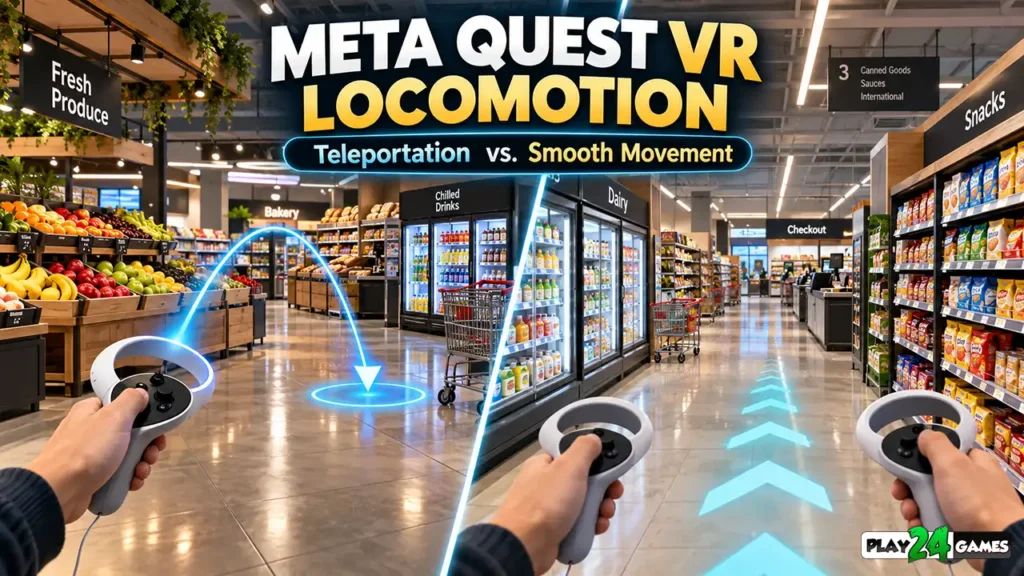
You’re standing near the entrance, surrounded by colorful product shelves, checkout counters, and shopping carts.
Your next task is to collect products from a storage room on the opposite side of the store.
How do you get there?
In one VR game, you might push a controller thumbstick and walk smoothly through the environment.
In another, you could point toward the storage room and instantly teleport to the selected location.
Both methods accomplish the same basic objective: moving the player through a virtual world.
However, they can create very different experiences.
Smooth movement may feel more like exploring a traditional first-person game. Teleportation can reduce some forms of motion discomfort, but it may make navigation feel less continuous.
For developers, choosing the right movement system involves balancing immersion, usability, accessibility, and player comfort.
For players, understanding these options can make it easier to select games and configure movement settings.
This guide explains Meta Quest VR locomotion, compares popular movement methods, and explores how thoughtful navigation design can improve immersive gaming experiences.
1. What Is VR Locomotion?
VR locomotion refers to the methods players use to move through a virtual environment.
Unlike traditional games, virtual reality tracks the player’s head and, depending on the application, their hands or controllers.
This creates two broad approaches to movement.
Physical Locomotion
Physical locomotion happens when players move their bodies in the real world.
For example, a player might take a few steps toward a virtual table.
The headset tracks that physical movement and updates the virtual viewpoint.
This can feel natural because the player’s physical motion corresponds to movement inside the game.
However, physical movement is limited by available space, tracking conditions, and the player’s abilities.
Artificial Locomotion
Artificial locomotion allows players to move farther through a virtual world without physically walking the entire distance.
Common examples include teleportation, thumbstick movement, and other controller-based navigation methods.
A player standing in a small room can potentially explore a much larger virtual environment.
Most expansive VR games require some form of artificial locomotion.
2. How Does Teleportation Work in Meta Quest Games?
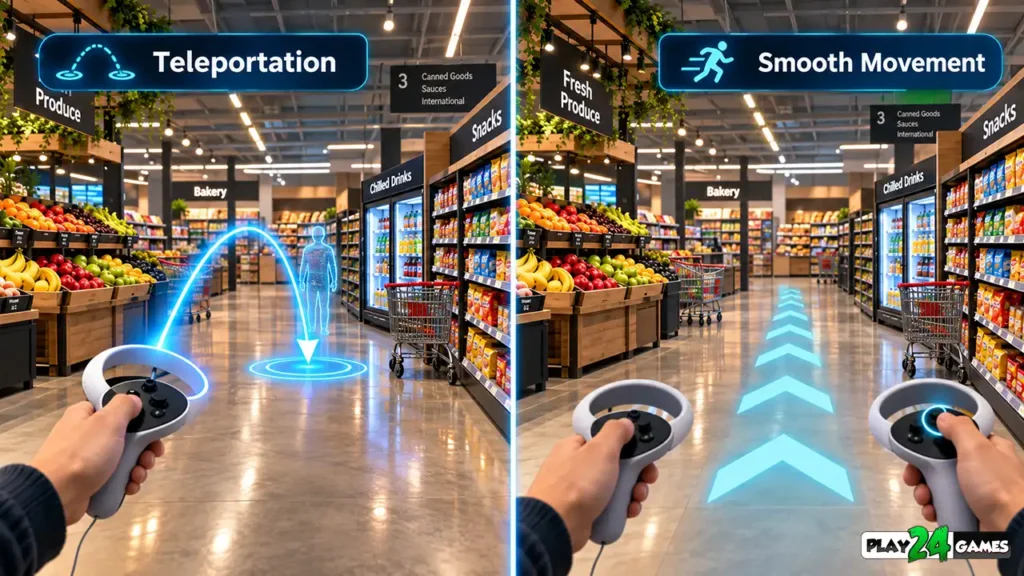
Teleportation is a movement method that allows players to select a destination and move directly to it.
In many VR applications, the player aims toward a location using a controller or supported hand interaction.
A visual indicator shows the intended destination.
After confirming the selection, the game moves the player’s virtual position.
Why Teleportation Can Feel Comfortable
Teleportation reduces the amount of continuous visual movement.
When a player uses smooth locomotion, the environment appears to move around them even though their physical body may remain stationary.
Teleportation avoids much of that continuous movement.
This can reduce certain forms of sensory mismatch associated with VR motion discomfort.
Meta’s official locomotion design guidance identifies teleportation and other discontinuous movement techniques as useful options for improving comfort. Meta Developers
When Teleportation Works Well
Teleportation can be particularly useful in exploration and simulation games.
Imagine a virtual bakery where players need to move between a kitchen, storage area, and checkout counter.
Instead of continuously walking through every aisle, the player could teleport between accessible locations.
This may help make navigation less physically demanding.
Limitations of Teleportation
Teleportation isn’t perfect for every experience.
Suddenly changing position can make players lose track of their surroundings.
For example, teleporting into an unfamiliar room may require a moment to understand the new orientation.
Developers can reduce confusion through clear destination indicators, predictable facing directions, and recognizable environmental landmarks.
3. What Is Smooth Locomotion in VR?
Smooth locomotion, sometimes called continuous or slide locomotion, allows players to move through the virtual environment continuously.
In many controller-based games, the left thumbstick controls movement.
The player can move forward, backward, or sideways without physically walking.
Why Players Choose Smooth Movement
Smooth locomotion can create a stronger sense of continuous exploration.
Imagine walking through a large virtual shopping mall.
With smooth movement, the environment changes gradually as you approach different stores.
You can observe the surrounding details while traveling.
This movement style may feel familiar to players experienced with first-person PC and console games.
Why Smooth Movement Can Cause Discomfort
Continuous virtual movement creates visual signals suggesting that the player is moving.
However, the body’s balance system may not detect corresponding physical motion.
This mismatch can contribute to visually induced motion discomfort.
Not everyone responds in the same way.
Some players tolerate smooth movement comfortably, while others prefer teleportation or shorter sessions.
Is Smooth Movement Better Than Teleportation?
Neither method is universally better.
Smooth movement provides continuous navigation.
Teleportation may be more comfortable for motion-sensitive players.
The most appropriate choice depends on the game and the individual player.
Meta’s locomotion best practices recommend providing multiple movement options when practical. Meta Developers
4. Teleportation vs. Smooth Locomotion: Key Differences
Both movement methods have advantages and limitations.
| Feature | Teleportation | Smooth Locomotion |
|---|---|---|
| Movement Style | Instant or transitional repositioning | Continuous movement |
| Player Control | Select a destination | Control movement direction |
| Visual Motion | Limited during repositioning | Continuous |
| Motion Comfort | Often preferable for sensitive players | May cause discomfort for some users |
| Navigation Feel | Discrete movement between locations | Continuous exploration |
| Orientation | Can cause temporary disorientation | Usually maintains spatial continuity |
| Common Applications | Exploration, simulations, accessibility-focused navigation | Action, adventure, exploration, simulations |
| Main Design Challenge | Clear destinations and orientation | Comfort, acceleration, and turning behavior |
Which Should Beginners Try First?
Players new to VR may benefit from starting with teleportation when a game supports it.
Once comfortable with the headset and controls, they can explore other movement methods.
However, beginners shouldn’t feel obligated to switch to smooth movement.
Comfort preferences are individual.
5. What Is Snap Turning in VR?
Moving forward isn’t the only navigation challenge in virtual reality.
Players also need to change their viewing direction.
They can physically turn their bodies, but games often provide artificial turning controls.
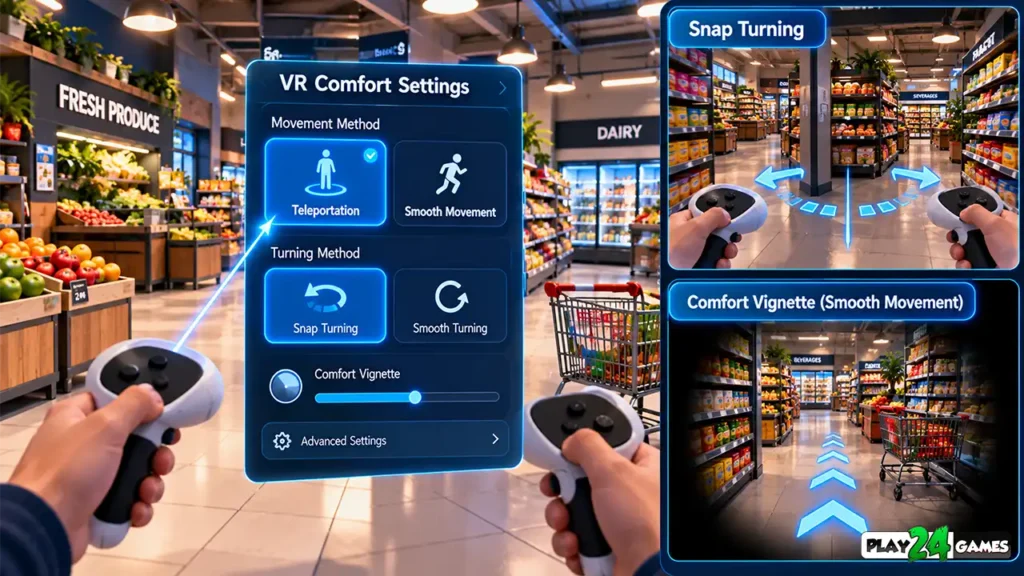
One common option is snap turning.
How Snap Turning Works
Snap turning rotates the virtual viewpoint in discrete increments.
For example, moving a thumbstick sideways might rotate the player by a configured angle.
Instead of continuously spinning, the view changes in steps.
Why Snap Turning Is Useful
Continuous artificial rotation can create strong visual motion.
Snap turning reduces the duration of that rotation.
This can make turning more comfortable for some players.
Snap Turning vs. Smooth Turning
Smooth turning rotates the viewpoint continuously while the relevant input is held.
It may feel natural to experienced first-person game players.
However, it can introduce discomfort for users sensitive to rotational movement.
Snap turning offers a different trade-off: less continuous visual motion, but a more noticeable change in orientation.
Meta recommends offering snap turning as a comfort-oriented option and allowing smooth turning as a configurable alternative where appropriate. Meta Developers
6. What Is a VR Comfort Vignette?
Some VR games provide a comfort feature called a vignette or tunneling effect.
A comfort vignette temporarily reduces the visible peripheral area during movement.
How Does It Work?
Imagine walking forward using a controller thumbstick.
As movement begins, the edges of the virtual view become darker or less visible.
When movement stops, the normal view returns.
The objective is to reduce peripheral visual motion that may contribute to discomfort.
Does a Comfort Vignette Work for Everyone?
Not necessarily.
Some players find it helpful.
Others prefer an unobstructed field of view.
For this reason, adjustable comfort settings can be valuable.
How Developers Implement It
Meta’s Interaction SDK provides a LocomotionTunneling component that works with movement and turning events.
The documentation, updated October 7, 2026, describes how the effect can respond to movement, rotation, and acceleration.
It also provides controls for the amount and appearance of peripheral occlusion. Meta Developers
The feature must be implemented and configured by the developer; it isn’t automatically available in every Meta Quest game.
7. Why VR Movement Speed Matters
Movement speed influences both gameplay and comfort.
A character moving slowly through a virtual environment creates a different visual experience from one moving rapidly.
Avoid Unnecessary Acceleration
Sudden or prolonged changes in virtual acceleration can increase sensory mismatch.
For example, a camera that repeatedly speeds up and slows down may feel uncomfortable.
Developers should evaluate movement acceleration and deceleration carefully.
Keep Movement Predictable
Players should understand how their input affects movement.
Unexpected camera motion can be disorienting.
For example, if the player releases the thumbstick, the movement system should respond consistently with the game’s intended controls.
Match Movement to the Game
A relaxed shop-management simulator doesn’t necessarily need fast movement.
A racing or action game may require a different approach.
Movement settings should support the intended experience rather than simply copying another game’s controls.
8. How Virtual Environments Affect Movement Comfort
Locomotion comfort isn’t determined only by controller settings.
The environment itself can influence how players experience movement.
Narrow Corridors and Visual Motion
Moving past nearby walls can create strong peripheral visual motion.
A narrow corridor filled with detailed textures may feel different from an open room.
Stairs and Elevation Changes
Rapid changes in virtual height can create additional discomfort.
For example, moving quickly up a steep staircase may produce vertical visual motion that doesn’t match the player’s physical experience.
Open Environments
Wider spaces can provide more flexibility for navigation.
Players may also find it easier to understand their location when important landmarks remain visible.
Meta’s virtual environment design guidance recommends considering slopes, nearby walls, camera collisions, and other environmental features when designing VR movement. Meta Developers
Example: A Virtual Supermarket
Consider a fictional supermarket simulation.
The developer could provide wide navigation paths between major departments.
Storage areas could use clear visual landmarks.
Teleport destinations could be positioned away from obstacles.
These choices may make the environment easier to navigate.
9. Seated vs. Standing VR Movement
Not every VR player wants to stand throughout an entire gaming session.
Some players prefer seated gameplay because of comfort, fatigue, mobility needs, or personal preference.
Standing Gameplay
Standing can make certain interactions feel more natural.
For example, reaching toward a virtual shelf may resemble a familiar physical action.
However, standing for extended periods may become tiring.
Seated Gameplay
Seated play can make longer sessions more accessible for some players.
However, the game must account for differences in the player’s physical position.
A button or object positioned for a standing player may be difficult to reach while seated.
Why Adjustable Height Matters
VR applications can support height adjustments so seated players can access relevant objects.
Meta’s October 7, 2026 locomotion documentation specifically discusses seated-mode height offsets as a way to improve access to interactions designed around standing height. Meta Developers
For developers, seated support should be tested rather than assumed.
For players, it’s worth checking whether a particular game officially supports seated gameplay.
10. Practical Example: Movement in a VR Shop Simulator
Imagine a hypothetical Meta Quest shop-management game.
The player operates a retail store containing merchandise shelves, a storage room, and a checkout counter.
Several movement approaches could support this environment.
Teleportation Between Departments
A player could select a destination near the storage area and teleport there.
This may reduce the need for continuous artificial movement.
Smooth Movement for Exploration
Players who prefer continuous navigation could use thumbstick movement to walk between shelves.
This approach may provide a stronger sense of physically exploring the store.
Snap Turning Near Shelves
Snap turning could allow players to adjust their viewpoint without physically rotating their bodies.
This may be useful when interacting with nearby objects.
Seated Gameplay Options
An adjustable player-height system could help seated players access merchandise and other interactive elements.
Why Multiple Options Matter
Different players have different preferences.
A movement system that works well for one player may be uncomfortable or inaccessible to another.
Providing appropriate options can make the same environment usable in different ways.
These examples illustrate possible design approaches, not confirmed features of any particular Play24Games release.
11. How Developers Test VR Locomotion
A movement system that works correctly in the Unity Editor may still require adjustments on actual VR hardware.
Testing should cover more than whether the player can move.
Test Movement Comfort
Evaluate teleportation, continuous movement, and turning separately.
Observe whether players experience discomfort or confusion.
If a player feels dizzy or unwell, they should stop rather than continue through the discomfort.
Test Navigation Accuracy
Verify that teleport destinations are valid.
Players shouldn’t accidentally move inside walls, through obstacles, or into inaccessible locations.
Test Different Player Heights
Check whether shorter, taller, seated, and standing players can navigate the environment where those modes are supported.
Test Camera Collisions
Unexpected camera movement can be particularly uncomfortable in VR.
Developers should carefully evaluate how the viewpoint behaves near walls, doors, and moving objects.
Test on Target Hardware
Meta’s Unity locomotion sample demonstrates teleportation, thumbstick movement, and turning approaches that developers can study.
The official Unity Locomotion Sample documentation was updated October 7, 2026.
Developers should verify SDK compatibility and test their own implementations on the intended headset.
12. Common VR Locomotion Mistakes to Avoid
One mistake is forcing every player to use smooth movement.
This can exclude players who are sensitive to continuous artificial motion.
Another is offering teleportation without clear destination indicators.
Players may become confused if they cannot predict where they will arrive.
Developers should also avoid unnecessary camera rotation, unpredictable acceleration, and abrupt viewpoint changes.
Ignoring seated gameplay can create accessibility problems.
Poor collision handling may cause players to experience unexpected virtual movement.
Finally, relying only on internal development testing can overlook issues experienced by new players.
Good VR locomotion should help players explore the environment without making movement itself an unnecessary obstacle.
13. Play24Games and Immersive VR Experiences
At Play24Games, our development direction includes mobile games and immersive virtual reality experiences.
Our VR projects explore how familiar activities can become interactive three-dimensional environments.
Cosplay Shop Simulator VR
Our announced Cosplay Shop Simulator VR project focuses on managing an anime-inspired retail store.
The concept includes merchandise, store organization, and interactive shop-management activities.
Movement design is an important consideration for this type of environment because players may need to navigate between different store areas.
Learn more through our Cosplay Shop Simulator VR announcement.
Bakery Supermarket Simulator VR
Bakery Supermarket Simulator VR is another announced Play24Games project centered on virtual store-management activities.
Its environment provides a useful example of why movement comfort and accessible navigation matter in simulation games.
Read our Bakery Supermarket Simulator VR announcement for additional project information.
Specific movement options, supported headsets, and gameplay features should be confirmed through the latest official release information.
Explore Our VR Games
Visit the Play24Games VR Games Collection to discover our immersive projects.
Conclusion
Meta Quest VR locomotion plays an important role in how players experience virtual environments.
Teleportation allows players to move between locations without continuous artificial movement.
Smooth locomotion provides a more continuous exploration experience but may cause discomfort for some users.
Snap turning, adjustable movement speed, comfort vignettes, and seated gameplay options can help accommodate different preferences.
For developers, effective movement design requires careful attention to camera behavior, environmental layout, accessibility, and headset testing.
For players, understanding these systems can make it easier to choose movement settings that suit their comfort level.
The best VR movement system isn’t necessarily the most complex.
It’s the one that supports the game’s design while allowing players to navigate confidently and comfortably.
Explore our VR gaming projects and follow our latest news and updates to learn more about Play24Games’ mobile and immersive gaming experiences.
Frequently Asked Questions
What is locomotion in Meta Quest VR games?
VR locomotion refers to the methods players use to move through virtual environments. It includes physical movement, teleportation, continuous thumbstick movement, and other navigation systems supported by individual applications.
Is teleportation better than smooth movement in VR?
Teleportation is often more comfortable for players sensitive to continuous artificial movement. Smooth locomotion provides continuous navigation and may feel more natural to experienced first-person game players. The best option depends on the game and the individual.
What is snap turning in Meta Quest?
Snap turning rotates the virtual viewpoint in discrete increments rather than continuously. It can reduce some forms of motion discomfort associated with artificial rotation, although sudden viewpoint changes may still feel disorienting to certain players.
Can VR comfort settings reduce motion sickness?
Features such as teleportation, snap turning, adjustable movement speed, and comfort vignettes may reduce discomfort for some players. However, no setting guarantees that a person will avoid motion sickness. Players should stop if they feel unwell.
Can Meta Quest games be played while seated?
Many Meta Quest experiences support seated gameplay, but compatibility depends on the individual game. Developers may need to provide height adjustments and accessible interaction methods to make seated navigation practical.