

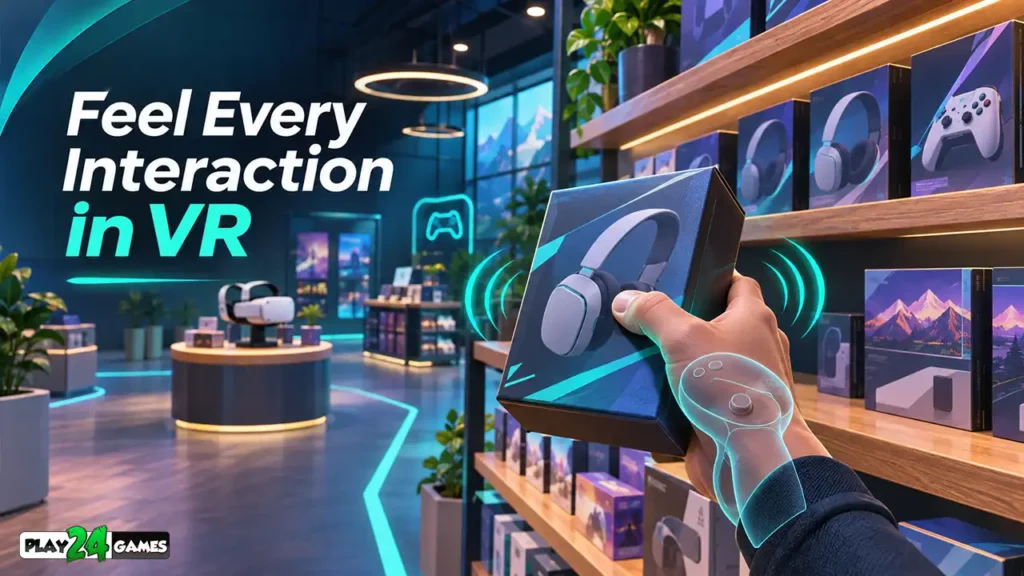
Imagine standing inside a virtual shop.
You reach toward a product on a shelf, close your virtual hand around it, and lift it into the air.
At that moment, your controller produces a small vibration.
You cannot physically feel the weight or surface of the product, but that brief sensation tells you something important: the game has recognized your action.
Now imagine placing the product onto a display shelf. Another subtle vibration confirms that it has reached the correct position.
These small physical responses can make an otherwise ordinary interaction feel more convincing.
This is the purpose of Meta Quest Haptic Feedback.
Virtual reality already combines immersive visuals, head tracking, motion controls, and spatial audio. Haptic feedback adds another sensory connection by allowing compatible controllers to vibrate in response to virtual events.
But how does it work, and why does it matter so much in VR games?
Let’s explore seven ways haptic feedback can improve virtual reality experiences.
1. What Is Meta Quest Haptic Feedback?
Haptic feedback is a technology that communicates information through physical sensations, commonly vibrations.
In Meta Quest games, supported motion controllers contain actuators that can produce different vibration effects.
When a game triggers a haptic response, the controller creates a physical sensation in the player’s hand.
This can help represent actions such as grabbing an object, pressing a button, colliding with a surface, or completing an objective.
According to Meta’s official Haptics SDK documentation, developers can create and play haptic effects using compatible Quest controllers. Meta Horizon OS Developers
How Is Haptic Feedback Different From Ordinary Vibration?
Traditional game controllers often use vibration to emphasize large events such as explosions or vehicle collisions.
VR haptics can also communicate smaller, more precise interactions.
For example, a short pulse may indicate that an object is ready to grab, while a different pattern can signal that an action has been completed.
The important distinction is not simply vibration strength. It is how effectively the sensation communicates what is happening in the virtual world.
2. Seven Ways Haptic Feedback Improves VR Gameplay
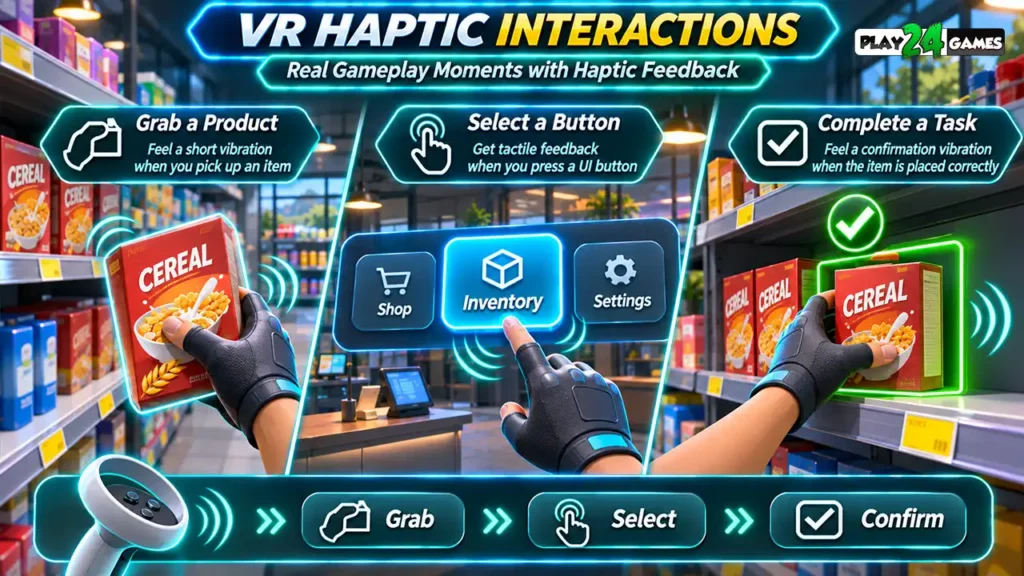
1. Makes Virtual Object Grabbing More Convincing
Grabbing objects is one of the most recognizable activities in VR.
Players can pick up tools, move products, open containers, or interact with environmental objects.
Without tactile feedback, the player depends mainly on visual information to determine whether an object has been selected.
A subtle controller vibration can confirm that the grab was successful.
Consider a hypothetical supermarket simulation. A player reaches toward a cereal box and presses the grip control. The box attaches to the virtual hand, and a short haptic pulse confirms the interaction.
When the player releases it, a separate effect could indicate that the item has been placed.
The result is a clearer interaction loop.
2. Makes Buttons and Menus More Responsive
VR interfaces often contain floating menus, interactive panels, and virtual buttons.
Unlike physical buttons, these controls do not naturally provide tactile resistance.
Haptic feedback can compensate for some of that missing physical response.
Imagine selecting a product category from a floating inventory panel.
A small vibration when the button is activated can help confirm that the selection was registered.
This is especially useful when visual feedback is subtle or when the player is concentrating on another part of the scene.
Meta provides predefined system haptic patterns for common interactions such as hovering, grabbing, releasing, and confirming successful actions. Meta Horizon OS Developers
However, haptic feedback should support visual clarity rather than replace it.
Players still need readable labels, recognizable controls, and understandable interface states.
For related interface design principles, see our Meta Quest VR UI design guide.
3. Adds Impact to Action and Racing Games
Action games can benefit from more noticeable haptic responses.
A racing game might use controller vibration to emphasize collisions or other gameplay events, depending on its control design.
A shooting game could use brief pulses to reinforce weapon firing.
A rhythm game might synchronize tactile feedback with successful interactions.
These effects can make actions feel more responsive, but stronger vibration is not always better.
If every event produces an intense response, important signals become harder to distinguish.
A well-designed haptic system creates contrast between ordinary interactions and significant events.
4. Helps Players Understand Successful Actions
VR gameplay frequently involves tasks where the player must determine whether an action has been completed.
Consider placing merchandise into a designated storage area.
A visual indicator might change color when the item reaches the correct position.
A haptic response can reinforce that confirmation.
The player receives two complementary signals: one visual and one tactile.
This can be especially helpful when the player is not looking directly at a status panel.
In a virtual shop, successful actions could include placing an item on the correct shelf, confirming a purchase, or completing an inventory task.
These are illustrative design possibilities, not claims about features in any particular Play24Games title.
5. Creates More Distinctive Virtual Objects
Not every virtual object needs to feel identical.
Developers can design different vibration patterns to represent different interaction types.
For example, opening a lightweight drawer might produce a brief pulse, while activating a large mechanical switch could produce a longer effect.
A soft item might use minimal feedback, whereas a heavy-looking metal object could have a more pronounced interaction cue.
These sensations do not reproduce actual weight, texture, or resistance.
Instead, they provide symbolic tactile information that works alongside visual animation and audio.
This distinction matters because controller haptics cannot fully recreate the physical properties of real objects.
6. Improves Gameplay Feedback Without Adding More UI
A common challenge in VR design is communicating information without filling the player’s view with unnecessary interface elements.
Traditional games often rely on notifications, icons, progress bars, and pop-up messages.
In VR, too many floating elements can interrupt immersion.
Haptics provide another communication channel.
For example, a short pulse might confirm an interaction, while a distinctive pattern could signal an invalid action.
This does not mean every notification should become a vibration.
Important information still needs appropriate visual or audio alternatives.
But carefully chosen tactile signals can reduce the need for repetitive on-screen confirmation messages.
7. Strengthens the Connection Between Player and Virtual World
The strongest benefit of haptic feedback is how it connects a player’s real movement with virtual events.
In VR, the player physically moves their hands while interacting with digital objects.
When the virtual action produces a matching tactile response, the interaction may feel more coherent.
Imagine opening a virtual door.
You reach toward the handle, press the grip control, and rotate your wrist.
A small haptic pulse indicates that the handle has engaged.
As the door opens, the animation and sound respond to your movement.
The combined experience connects physical action, visual response, sound, and tactile feedback.
No single element creates immersion by itself. The effect comes from how consistently these systems work together.
3. How Meta Quest Controllers Produce Haptic Feedback
Meta Quest controllers use built-in hardware to generate vibrations.
A game sends instructions through the relevant input or haptics system, and the controller produces the requested response within its supported capabilities.
Different controllers do not necessarily offer identical haptic fidelity.
Meta’s documentation distinguishes simple haptics, predefined system effects, parametric haptics, PCM-based effects, and controller-specific features.
Some newer controller types support more sophisticated frequency variation than older models. Meta Horizon OS Developers
Are All Meta Quest Controllers the Same?
No.
Controller capabilities vary by hardware generation.
For example, Touch Pro and Touch Plus controllers support capabilities that differ from earlier Touch controllers.
Developers should therefore avoid assuming that a vibration pattern will feel identical on every supported headset.
The Meta XR Haptics SDK is designed to help adapt haptic playback to compatible controllers.
For players, the practical takeaway is simple: the tactile experience may vary between devices and games.
4. Haptic Feedback in VR Simulation Games
Simulation games are particularly interesting because they often recreate familiar real-world activities.
Players may manage a shop, operate equipment, organize products, prepare food, or interact with machinery.
These tasks involve repeated hand movements and object interactions.
Example: A Virtual Retail Store
Consider an illustrative VR store-management experience.
The player begins by unpacking products from a delivery box.
When the player grabs a product, the controller produces a small pulse.
After placing it on the correct shelf, another response confirms successful placement.
At the checkout counter, selecting a payment button produces a brief confirmation effect.
Each vibration communicates a specific event.
The goal is not to make every movement vibrate. It is to provide useful feedback at meaningful moments.
Why Subtle Feedback Matters
Store-management games may involve hundreds of repeated interactions during a play session.
If every action triggers an intense vibration, the effect can become distracting or tiring.
A better design uses short, restrained feedback for routine tasks and reserves more distinctive effects for important events.
Players interested in the broader mechanics of this genre can explore our VR shop simulator gameplay guide.
5. How Haptics, Visuals, and Spatial Audio Work Together
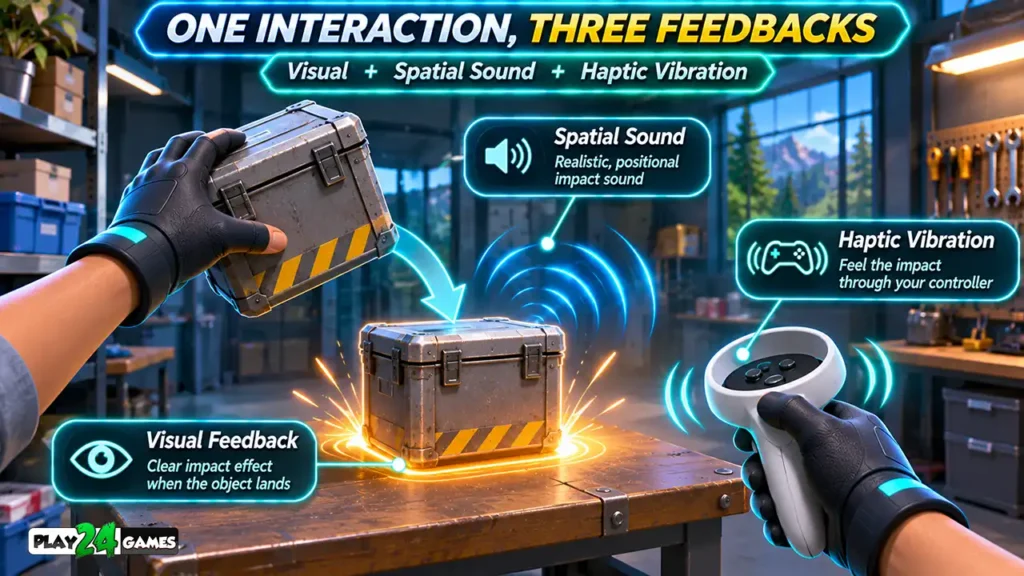
Haptic feedback becomes more useful when it complements other sensory systems.
Imagine dropping a metal object onto a virtual table.
Three things might happen simultaneously:
- The object visibly contacts the table and stops moving.
- A metallic impact sound plays from the object’s position.
- The controller produces a brief vibration associated with the collision.
These responses help the event feel connected.
If the vibration happens noticeably before the visual impact, the interaction may feel inconsistent.
If the sound plays from the wrong direction, the scene can become less convincing.
This is why timing and consistency matter.
Spatial audio adds another layer by making sound sources appear connected to locations within a virtual environment.
For a detailed explanation, read our Meta Quest spatial audio guide.
6. Can Haptic Feedback Improve VR Accessibility?
Haptic feedback can provide an additional way to communicate certain gameplay events.
For example, a tactile confirmation may help a player notice that a virtual button was activated without relying exclusively on sound.
However, haptics should not be treated as a universal accessibility solution.
Some players may be sensitive to vibration, prefer reduced feedback, or use input methods that do not provide controller-based haptics.
Games should avoid making essential information available only through vibration.
Where appropriate, developers can provide adjustable haptic intensity or an option to disable nonessential effects.
The broader principle is to offer multiple ways to understand important gameplay events.
7. Haptic Feedback vs Hand Tracking
Hand tracking and controller-based haptic feedback are different technologies.
Hand tracking uses headset cameras and software to estimate hand movements without requiring the player to hold a controller.
Controller haptics use physical actuators inside compatible motion controllers.
As a result, ordinary controller vibrations are not available when a player interacts using only bare-hand tracking.
A hand-tracking experience can still provide visual and audio confirmation, but it cannot create the same controller-based tactile response without additional physical hardware.
This is an important design trade-off.
Some VR games prioritize natural, controller-free interactions. Others use controllers for their buttons, tracking, and tactile feedback.
For a deeper comparison, see Meta Quest hand tracking vs controllers.
8. How Developers Design Better VR Haptic Effects
Good haptic design begins with the purpose of the interaction.
Developers should first decide what information a vibration needs to communicate.
Is it confirming a successful grab? Warning about an invalid action? Emphasizing an impact?
Once the purpose is clear, the team can select an appropriate pattern.
Start With Important Interactions
It is rarely necessary to add vibration to every gameplay event.
Prioritize actions where tactile feedback provides useful confirmation.
Common candidates include grabbing, releasing, selecting, activating, colliding, and completing tasks.
Choose the Appropriate Haptics System
Meta provides several options for different requirements.
The official haptic runtime API documentation describes predefined system patterns, simple vibrations, and more advanced haptic controls.
Developers working with Unity can also review the Meta XR Haptics SDK setup guide.
The correct approach depends on the project, controller compatibility, and desired effect.
Test on Actual Hardware
Editor simulations cannot fully communicate how a vibration feels in a player’s hand.
Developers should test effects on their intended Quest controllers.
Check whether the feedback is noticeable, appropriately timed, and comfortable during repeated gameplay.
A pattern that feels useful once may become distracting when triggered dozens of times.
Keep Feedback Consistent
Similar interactions should generally use recognizable feedback patterns.
If selecting a button produces one type of vibration in the main menu, a comparable interaction elsewhere should not unexpectedly use a completely different effect without a design reason.
Consistency helps players learn the relationship between actions and responses.
9. Common Meta Quest Haptic Feedback Mistakes
Making Every Vibration Too Strong
Intense feedback can be useful for major events, but applying it everywhere reduces contrast and may become uncomfortable.
Use stronger effects selectively.
Triggering Haptics Too Frequently
Repeated vibrations during continuous movement can become distracting.
Avoid unnecessary effects and consider cooldowns or event filtering where appropriate.
Ignoring Controller Differences
Not every controller supports identical haptic features.
Test fallback behavior and avoid relying on hardware-specific effects without checking compatibility.
Poor Timing
A delayed vibration can make an interaction feel disconnected.
Coordinate haptics with animations, object events, and audio.
Relying Only on Vibration
A player should not need to feel a vibration to understand an essential game event.
Combine tactile feedback with appropriate visual or audio cues.
Skipping Real-Device Testing
Haptic patterns should be evaluated through actual gameplay sessions, not just technical implementation checks.
10. Practical Tips for Players
Players can also benefit from understanding how haptics work.
When trying a new VR game, pay attention to whether controller vibrations communicate successful interactions or important gameplay events.
If a game offers haptic intensity settings, experiment with a comfortable level.
Remember that different titles may use haptics differently, and some interactions may not produce vibrations at all.
If vibration appears to be missing, check whether the game supports the feature, whether the controllers are functioning correctly, and whether the game offers vibration-related settings.
Do not assume every missing vibration indicates a hardware fault.
Conclusion
Meta Quest Haptic Feedback adds a valuable physical communication channel to virtual reality.
From grabbing products in a simulation game to activating menus and experiencing impacts in action games, carefully designed vibrations can make interactions clearer and more convincing.
The best haptic systems are not necessarily the strongest or most complicated. They are the ones that provide useful feedback at the right moment.
As VR experiences continue to develop, the combination of tactile feedback, responsive controls, spatial audio, and thoughtful interaction design remains an important part of immersive gameplay.
Explore more virtual reality experiences and game-development insights at Play24Games VR Games.
Frequently Asked Questions
Do all Meta Quest games support haptic feedback?
No. Haptic support depends on the game, its implementation, the controller type, and the supported hardware. Some titles use extensive vibration effects, while others use little or none.
Can haptic feedback make virtual objects feel physically real?
It can make interactions more convincing, but standard controller vibrations cannot reproduce actual object weight, texture, or resistance. They provide tactile cues rather than complete physical simulation.
Does Meta Quest hand tracking provide the same haptic feedback as controllers?
No. Bare-hand tracking does not provide the physical vibration generated by controller actuators. Hand-tracking applications generally rely on other feedback methods unless additional haptic hardware is used.
Can developers customize haptic vibration patterns?
Yes. Supported development tools allow developers to create different haptic responses. The available control and fidelity depend on the API, runtime, and controller hardware.
Why does haptic feedback feel different between VR games?
Developers choose different patterns, strengths, timing, and interaction triggers. Hardware differences can also affect the resulting sensation.


[…] For more on tactile interaction, see our Meta Quest haptic feedback guide. […]