


You’re driving along a busy virtual highway. The road ahead looks clear, your speed is increasing, and you’re getting closer to beating your previous distance.
Suddenly, a vehicle changes lanes.
You turn too sharply, lose control, and crash.
It’s a familiar situation for anyone who enjoys mobile racing games. Driving fast is exciting, but surviving difficult traffic, maintaining control, and choosing the right moment to overtake require more than holding the accelerator.
That’s where a few practical Offline Car Racing Game Tips can make a difference.
Offline racing games are particularly enjoyable because many let you practice without depending on a continuous internet connection. Whether you’re completing driving challenges, navigating traffic, or trying to improve your personal performance, learning a few fundamentals can make each session more rewarding.
Here are nine techniques worth practicing.

1. Learn Your Steering Controls Before Increasing Speed
One of the biggest beginner mistakes is trying to drive at maximum speed before becoming comfortable with the controls.
Mobile racing games may offer several steering methods, including tilt controls, touch buttons, and virtual steering wheels.
Each method feels different.
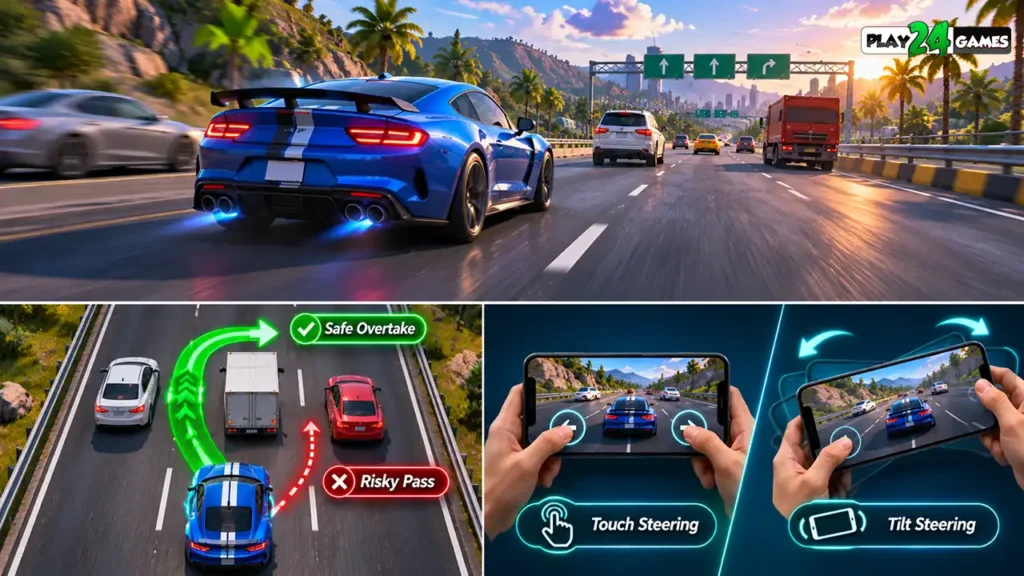
Tilt Steering
Tilt controls use the phone’s motion sensors to interpret steering movements.
Small wrist adjustments may be enough to change direction.
If your game supports steering sensitivity adjustments, begin with a moderate setting rather than immediately choosing the highest sensitivity.
Touch Steering
Touch controls generally use on-screen buttons or directional areas.
These can feel more predictable for players who prefer keeping their phone steady.
Practice small corrections instead of holding the steering button continuously.
Practical tip: Spend your first few runs learning how quickly the vehicle responds before attempting difficult overtakes.
2. Look Ahead Instead of Watching Only Your Car
When driving through traffic, focusing exclusively on your own vehicle can make upcoming obstacles harder to anticipate.
Try to watch the road farther ahead.
This helps you identify traffic patterns and prepare for lane changes.
Read Traffic Movement
Imagine three vehicles ahead of you.
One occupies the left lane, another is moving slowly in the center, and the right lane appears open.
Rather than accelerating immediately, observe whether the open lane remains clear.
In games with moving traffic, the safest route can change quickly.
Avoid Last-Second Reactions
A sudden steering correction at high speed can cause a collision, especially when another vehicle is close.
Earlier decisions generally provide more room to maneuver.
Practical tip: Identify your next safe driving space before entering a crowded section of road.
3. Control Your Speed Instead of Accelerating Constantly
Speed is one of the most exciting parts of a racing game, but it also reduces the time available to react.
A vehicle traveling quickly covers more distance before you can make a correction.
This matters in highway driving games where traffic may appear from different lanes.
When Should You Slow Down?
Consider reducing speed when approaching dense traffic, narrow gaps, sharp corners, or unfamiliar road sections.
If a game includes braking controls, use them deliberately rather than treating braking as a last resort.
Smooth Acceleration Matters
Constantly switching between maximum acceleration and sudden braking can make vehicle handling unpredictable.
Where the game’s physics allow it, gradual acceleration and controlled deceleration can help maintain stability.
Practical tip: Practice completing a run without unnecessary crashes before focusing on your highest possible speed.
4. Choose Safe Overtaking Opportunities
Overtaking traffic is a central challenge in many highway racing games.
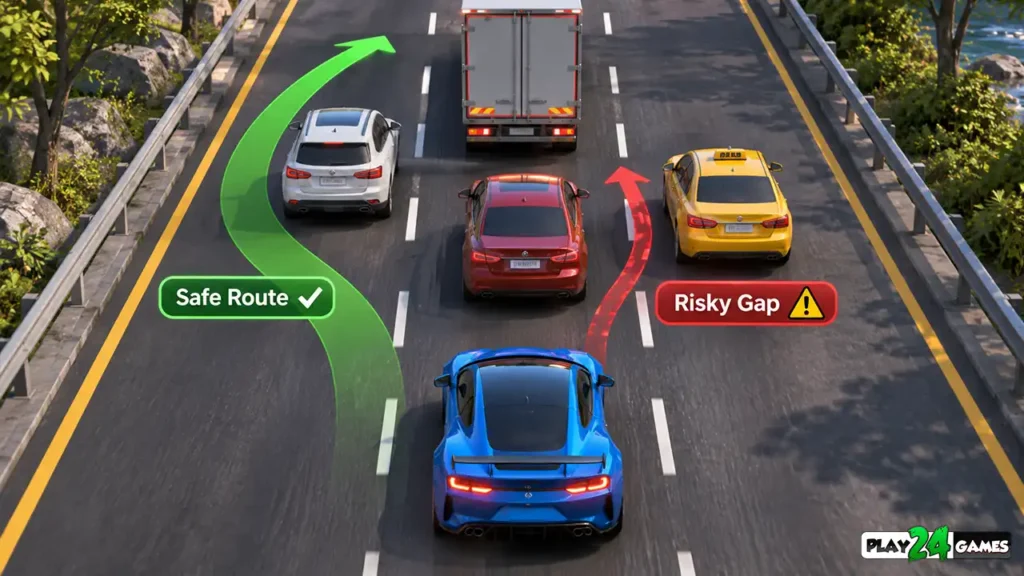
It can be tempting to squeeze between two vehicles whenever a narrow gap appears.
However, a gap that looks wide enough from a distance may become difficult to navigate as you approach.
Evaluate the Gap
Before overtaking, consider your current speed, the position of nearby vehicles, and whether you have enough room to complete the maneuver.
If another vehicle is approaching from behind or moving into the same lane, the opening may not remain available.
Avoid Repeated Lane Switching
Rapidly moving left and right can make the car harder to control.
Instead, choose a lane with enough clear space and remain there until another change is necessary.
Practical tip: A controlled overtake is usually more useful than a risky maneuver that ends your run.
5. Understand Different Racing Game Modes
Not every racing mode rewards the same driving behavior.
Some emphasize survival and distance, while others focus on reaching objectives or completing a course quickly.
Understanding the mode helps you choose the right strategy.
| Racing mode | Main objective | Useful approach |
|---|---|---|
| Endless Racing | Continue driving and avoid failure | Prioritize consistency and traffic awareness |
| Time Trial | Complete a course efficiently | Reduce unnecessary braking and mistakes |
| Challenge Mode | Meet specific mission objectives | Read the objective before starting |
| Free Ride | Explore or practice driving | Experiment with handling and controls |
| Speed-Based Challenge | Maintain or achieve required speed | Balance acceleration with available road space |
These are common racing-game patterns; individual games may implement different rules.
Example: Racing Mania 2
Play24Games’ Racing Mania 2 describes modes including traffic rush, challenge, speed bomb, and free ride. The published game description also mentions offline gameplay and vehicle upgrades.
Players can use less demanding modes to become familiar with the controls before attempting more challenging objectives. Actual difficulty and available features should be checked in the current game version.
6. Practice Smooth Cornering and Lane Changes
Not all racing games involve complex corners. Some focus on straight highways with traffic, while others include curved roads and technical tracks.
In either case, smooth steering is valuable.
Avoid Oversteering
Oversteering in a mobile game often means making a larger steering input than necessary.
For example, if you’re moving from the center lane to the left lane, a small controlled adjustment may be sufficient.
Holding the steering input too long could send your vehicle farther than intended.
Learn the Racing Line
On tracks with corners, a racing line is the path a driver takes through a turn.
In simplified racing physics, a smooth path can help avoid unnecessary corrections.
However, the best line depends on the game’s handling model, track layout, and obstacles.
Use Free Driving for Practice
If your game offers a free ride or practice mode, use it to experiment with steering behavior without focusing entirely on winning.
Practical tip: Try repeating the same corner or lane-change maneuver at different speeds to understand how the vehicle responds.
7. Choose Vehicle Upgrades That Match Your Driving Style
Many racing games include multiple vehicles or upgrade systems.
Players often choose the fastest-looking car first, but top speed isn’t the only characteristic that matters.
Depending on the game, vehicles may differ in acceleration, handling, braking, or other statistics.
Handling vs Top Speed
A car with strong handling may be easier to control in traffic-heavy environments.
A vehicle with greater top speed may be useful on open roads but harder to manage in narrow spaces.
These differences depend on how the game implements its vehicle physics and upgrade system.
Upgrade With a Purpose
Before spending earned in-game currency, identify your biggest problem.
Are you struggling to steer accurately? Do you need better acceleration for a particular challenge? Are you having difficulty controlling speed?
Choose upgrades that address the issue, when the game provides those options.
Practical tip: Avoid spending all your currency on an upgrade simply because it is the most expensive. Review what it actually changes.
8. Improve Performance for More Consistent Controls
A racing game can become harder to play when the device experiences stuttering, overheating, or inconsistent responsiveness.
Mobile games depend on the device’s CPU, GPU, memory, thermal conditions, and software environment.
If frame delivery becomes inconsistent, steering and obstacle timing may feel less predictable.
Close Unnecessary Background Activity
If your phone is struggling, close demanding applications that are not needed during gameplay.
This may help reduce resource competition, although the benefit varies by device.
Adjust Graphics Settings When Available
Some racing games provide graphics quality or frame-rate options.
If supported, consider a lower graphics preset when high settings cause repeated stuttering.
A consistent visual experience may be more useful than maximum graphical detail.
Keep Your Device Comfortable
Long gaming sessions can warm up a phone.
If the device becomes unusually hot or performance drops significantly, stop playing and allow it to cool.
Avoid charging under blankets or using the phone in conditions that trap heat.
Google’s Android game optimization documentation explains how game performance depends on efficient use of device resources.
Practical tip: Prioritize stable gameplay over unnecessary visual settings, especially on entry-level Android phones.
9. Improve Through Short, Focused Practice Sessions
Playing repeatedly can help, but practice is more effective when you focus on one skill at a time.
Instead of trying to improve everything in a single session, choose a specific objective.
Session One: Steering
Concentrate on smooth lane changes and avoiding excessive corrections.
Session Two: Traffic Awareness
Look farther down the road and identify safe overtaking opportunities earlier.
Session Three: Speed Management
Practice slowing down before crowded sections and accelerating only when sufficient space is available.
Session Four: Challenge Objectives
Apply the skills you’ve practiced to a specific racing mission.
This approach makes it easier to understand what you’re improving.
You can also compare your own results, such as completed objectives, distance traveled, or collisions avoided, when the game provides that information.
The goal isn’t to become perfect immediately. It’s to recognize patterns and make more deliberate decisions.
Common Mistakes Beginners Should Avoid
Several habits can make mobile racing games unnecessarily frustrating.
One is holding the accelerator continuously, even when traffic becomes crowded. Another is making sudden lane changes without checking the surrounding vehicles.
Players may also choose overly sensitive steering controls, spend upgrades without understanding their benefits, or ignore performance problems that affect responsiveness.
A less obvious mistake is switching between several control methods too frequently. Give yourself time to become familiar with one setup before deciding whether it works for you.
Finally, don’t assume that every racing game uses the same physics. A technique that works in an arcade highway racer may not transfer directly to a simulation-focused driving game.
Why Offline Racing Games Are Convenient
Offline mobile racing games can be a practical entertainment option when internet access is limited or unreliable.
Depending on the title, players may be able to enjoy core driving modes without a continuous connection.
This can be useful during travel or in places with unstable connectivity.
However, offline support varies by game.
Some titles may still require internet access for initial downloads, updates, advertisements, purchases, account features, or certain multiplayer functions.
Always check the individual game’s description rather than assuming every feature works offline.
For players who enjoy highway driving, traffic avoidance, and multiple driving challenges, Play24Games’ Racing Mania 2 is one option to explore.
Conclusion
The most useful Offline Car Racing Game Tips aren’t complicated tricks. They’re basic driving habits that become more effective with practice.
Learn your controls, anticipate traffic, manage speed, choose safer overtakes, and understand the objectives of each racing mode.
When combined with suitable vehicle choices and stable device performance, these techniques can help make mobile racing more enjoyable.
Whether you’re practicing highway driving or completing challenges, consistent control matters more than simply accelerating at every opportunity.
Explore Racing Mania 2 and other mobile games from Play24Games for more driving and gaming experiences.
Frequently Asked Questions
How can beginners improve at offline car racing games?
Start by learning the steering controls, maintaining manageable speeds, watching traffic ahead, and practicing smooth lane changes. Focus on avoiding mistakes before trying to drive as fast as possible.
Are tilt controls better than touch controls?
Neither method is universally better. Tilt steering may feel natural to some players, while touch controls may provide more predictable input for others. Choose the method that feels comfortable and responsive in the specific game.
Do offline racing games need internet access?
Some allow core gameplay without internet, but downloads, updates, online events, purchases, and other services may still require a connection. Check each game’s requirements.
Why does my car keep crashing in traffic racing games?
Common causes include excessive speed, late steering decisions, narrow overtaking gaps, and overcorrecting during lane changes. Practice reading traffic earlier and making smaller steering adjustments.
Can lower graphics settings improve racing gameplay?
If the device is struggling with performance, reducing graphics quality may help achieve more consistent gameplay when the game supports adjustable settings. The actual improvement depends on the device and game.